
In the current age, our cell phones are just about the most important thing that we have as travelers. It’s where our maps are. It’s how we get a ride to our destination. It’s how we communicate with people whose language we can’t speak. It’s where our boarding passes are. It’s how we pay for things. It’s how we figure out which pack of butter is the salted one! And that doesn’t even touch on it being our camera, video camera, gaming system and general entertainment. It’s how our bank contacts us to confirm our identity, it’s how we keep in touch with friends and family. Oh, and did I mention that they also allow you to make and receive phone calls? You’d be nearly paralyzed in a foreign country without it.
I’ve been intending to write a blog post to serve as a guide for how to set up your phone for extended travel and plan to write another post discussing my strategies to reduce the chances of losing my phone when traveling.
I want to start by giving a bit of context which will likely color some if not most of what follows. I’m an iPhone/Apple user from the United States. An Android user from the UK may have a very different situation. So keep that in mind while reading.
First things first. How do I keep my US phone number without paying a ton of money to US phone companies?
There are a number of solutions and alternatives. These are ones that I am aware of that are popular with long term travelers:
- Google FI/T-Mobile
- VOIP (Voice Over Internet Protocol) like Google Voice
- MVNO (Mobile Virtual Network Operator) like Tello, US Mobile, Mint
I suppose if you really like spending money (and detest competent customer service) you could use AT&T, but… don’t do that.
I’ll quickly describe the above options and then explain what I chose to do and why.
Google FI / T-Mobile (US Plan with International Roaming)
These and other companies with built in international plans looked good on paper to me but when I started seeing long term travelers talk about being shut off during extended stays outside of the US, I got concerned. It seems that the terms and conditions of these plans usually have a maximum amount of time that you can have the phone outside of the US before they’ll cut you off. It seems like that wording had always been there but the companies were inconsistent about enforcing it. That has changed in recent years and as you hit your time out of the US limit, they’ll disable your service until you return. I’m told there are work arounds. The most common, and simplest is to set up a family plan with a US based family member that has the bill in their name, with their address. I’ve heard folks mostly mention this in connection with to T-Mobile. If that situation works for you, it may be the best.
Google Voice (VOIP)
VOIP stands for Voice Over Internet Protocol. It allows you to make phone calls (to land lines), or send and receive texts by just using the internet and not needing cellular data.
The service has been and continues to be free. You you set it up by going to https://voice.google.com/. Google can provide a phone number for you, or you can port your current cell phone number to their service.
Many slow traveler types do it this way. They port their current US number to Google Voice and and just get international data via a foreign data plan, or just use WiFi.
For long while, this was my plan too. Since I’m a bit paranoid, I wanted to see how this service would work before I switched to living nomadically. So I ported my US number to Google Voice a couple of years ago to try it out.
The porting process cost 20 dollars, I believe. But it was pretty quick and I was up and running in a day or so.
I’ll start by saying that it works. In fact, it works quiet well and has some awesome advantages too. One of my favorite features is that once you have your number on Google Voice, you can make and receive phone calls from a web browser. I love this because now if something unfortunate happens to your phone, you can still make calls and send texts.
But here are the downsides. Now remember, I’m an Apple user, so this may be slightly different on Android. On iOS, once you port your number to Google Voice, you become a “green bubble” person. (Stop laughing, Android users!) You no longer have iMessage access. What’s even worse is that in order to make calls and get texts you have to use the Voice app. And that app is awful. It really made using the phone features of my iPhone unbearable. No emojis, the app is slow and in my experience a bit crashy. It was a very clumsy experience.
The next downside is that some banks and financial institutions, in an effort to protect themselves and their customers, won’t send a two-factor authentication code to a VOIP number. There are security concerns with VOIP that some institutions just won’t accept. Ally bank is one that I know for sure will not use VOIP. Some people say that you can increase the chances of success by porting your personal cell number to Google Voice, as opposed to having Google assign you one, but the last thing I wanted was a critical financial link to be severed because they changed their security policy when I’m half a world away.
To top that off, I read a story by another traveler on Facebook who encountered some kind of technical or security issue with Google and they blocked his number. What was worse? He couldn’t get it back. There was no one to call or talk to. I mean, it’s a free service and you get what you pay for. If I remember correctly I think that he did eventually manage to get his number back but it took months. That was the deal sealer for me. I could not accept that level of risk.
MVNO’s (Tello, US Mobile, Mint, etc.)
MVNO = Mobile Virtual Network Operator. It basically means that the company that you’re paying for your phone service doesn’t actually own the towers and infrastructure. In other words, these operators pay to use the towers owned by the large companies (AT&T, T-Mobile, Verizon) to provide their service. I believe that this was all a result of lawsuits in the US about monopolies which require the big guys to share their networks.
While you may never have seen the MVNO acronym, you’ve likely heard of some of the big players in that space. Mint, US Mobile and Tello are three popular ones and I’m sure that there are many more.
These providers basically sell you a prepaid data plan. You pay at the beginning of the month for an allotment of data/voice & text and once you hit your limit you either top it off, or wait for it to automatically renew at the next interval. There are some differences in what these companies offer. I’ll leave that for you to discover. But for me, this ended up being “the” solution for our travel needs.
My Current Solution
I’ve never used Mint, but I did use US Mobile for a while. US Mobile’s customer service is amazing. Their people are competent, their service works extremely well. And it’s very reasonably priced. The main reason that I switched from US Mobile to Tello before launching my nomad life was a subtle but critical aspect of their service. I’ll mention what that is in a minute, because first I want to explain how I use Tello for extended, extensive world travel.
Tello’s prepaid plan is a real phone service. It’s not like VoIP, which is using the internet to make phone connections. It’s using the cellular network. A subtle (to me as a user) but critical distinction to banks and financial institutions. In order to use Tello all around the world, I actually don’t use their service for data. I only use them for Voice and SMS.
Now here is the key piece of information that I was unaware of until a fellow (but much more experienced) world traveler, Cris Gawlik opened my eyes to.
You don’t need to have cell service to make and receive phone calls on a cell phone!
That was a mind blowing piece of new information for me.
You see, your cell plan… now I may be wrong here but I believe that they all support this… your cell plan should offer the ability to make phone calls over WiFi. (Somehow this is still not VoIP. Maybe someone smarter than me can explain why it’s different… but, all I can say is that it is. Things that don’t work with VoIP, do work with using your real cell plan over WiFi).
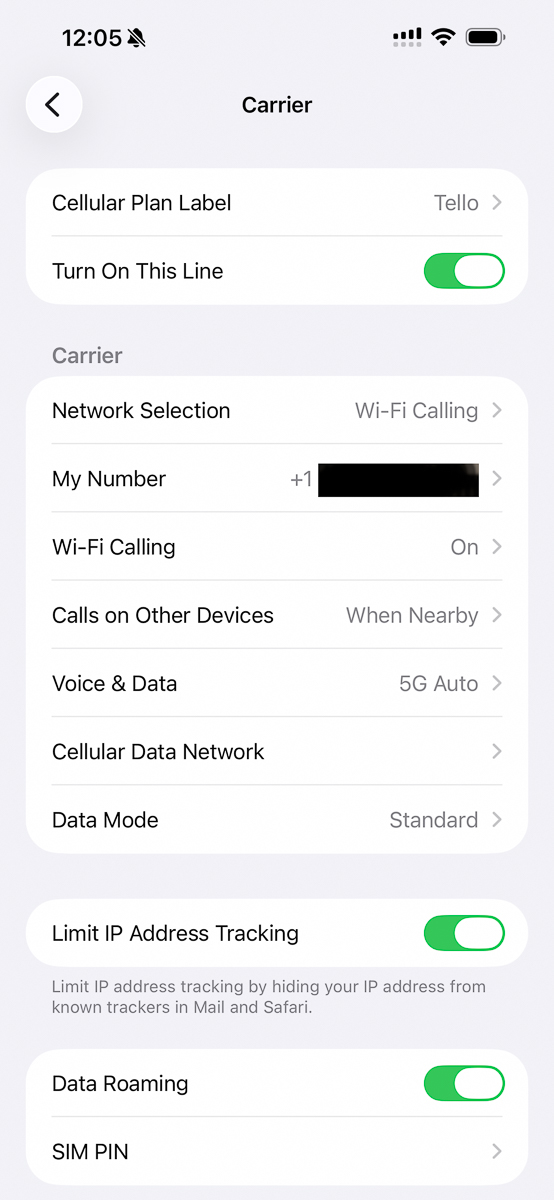
Setting it up is simple. When your US phone number and phone plan are up and running go into Settings>Cellular and scroll to SIMs. You probably only have one entry there if you’re new to this. Tap on that one entry, or the one that shows your phone number and phone company. On that screen scroll down to the section called “Carrier”. From there you should see a switch to enable “WiFi Calling”.
I was loosely aware of WiFi calling because I knew that you could use that option to avoid wasting (precious) cell data when you were at home with your phone connected to WiFi. But what I did not know is that once you enable WiFi calling, your phone considers any data connection that it has to be WiFi. What this means is that if you install a data only SIM or eSIM in your phone which provides only data, your real phone number, with WiFi calling enabled, will use that connection to make and receive phone calls and texts.
It seemed too good to be true so… as any reasonable person would, I went to Germany to try it out.
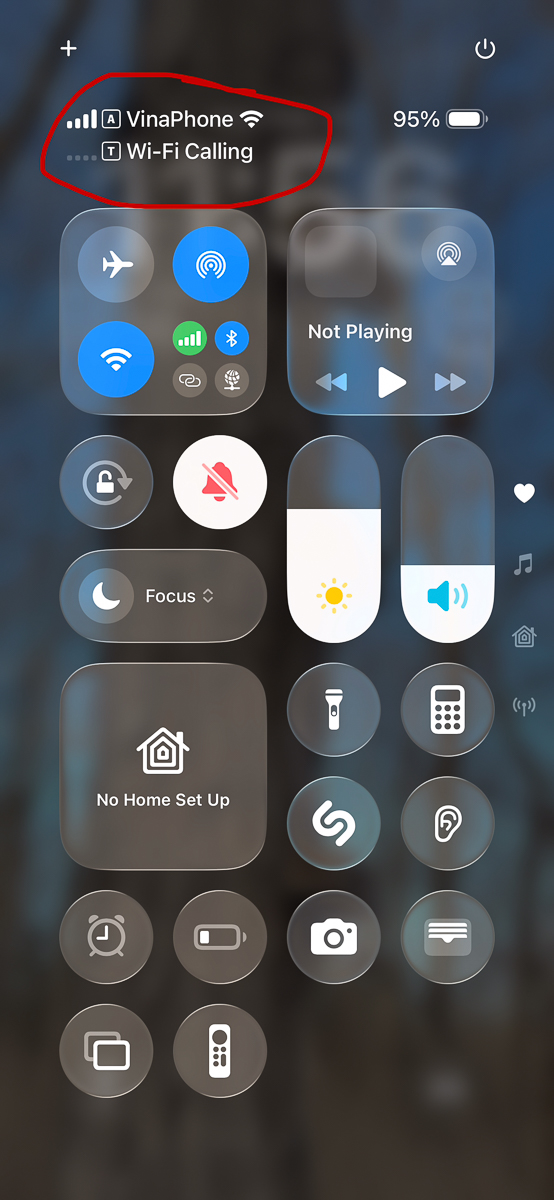
On a hike outside of Baden Baden, I fired up my Bank of America app which always requires a two-factor security code. And in a few seconds, I had my code. No WiFi router in sight. Just an Airalo eSIM for data, and WiFi calling enabled on my US SIM. If you look at the information at the top of your phone you can see that both lines are enabled, but only one of them has a connection. It doesn’t matter in the least. Your phone works just like it would if you were connected back in the US. Voice works. Texts work. And it doesn’t matter where you are. As long as you have data.
In this configuration you have both SIM’s enabled. The one with your real phone number, and a second one which only has data.
Now that I’ve explained that, let me tell you why I switched from US Mobile (who I love) to Tello.
I was reading Cris Gawlik’s posts about getting a new phone in Australia and setting up her plan there. It didn’t occur to me that there was anything strange about setting this up outside of the US. By pure coincidence, on my first time attempting to enable WiFi calling with my MVNO plan with US Mobile I was outside of the country. I was on a layover on the way to India and my phone would not let me turn WiFi on. After a quick chat with US Mobile, they informed me that I had to be in the US to enable it! That was when I learned that Tello didn’t have this limitation. The next month, I switched. As a nomadic traveler, I wanted to avoid having that limitation on the off chance that I needed to replace a phone while on the road.
Using WiFi calling with a secondary data SIM for travel would work just fine with any of the big guys too. (I’m pretty sure). The reason for switching to a prepaid MVNO plan like Tello was purely for price. My Tello plan (which isn’t even the cheapest) costs like six dollars a month. A very low price to pay for keeping my US number alive and available while I travel.
eSIMs
What I’ve discussed to this point was purely about how to keep your number working. But you’ll still need an eSIM or a physical SIM card in order to have data when you’re outside of the US. There are tons of options in that space, and as far as I know any of those options will work with your wifi calling setup. I’m currently using a regional sim with Airalo. Next month I’ll be using Flexirome. I also use Roamless as a backup, and I’ve used Mexfon while in Mexico because it was much cheaper.
Summary
- Get a cheap US data plan to keep your US number.
- Turn on WiFi calling on the US line.
- Add a second eSIM or SIM with data only
- Profit?
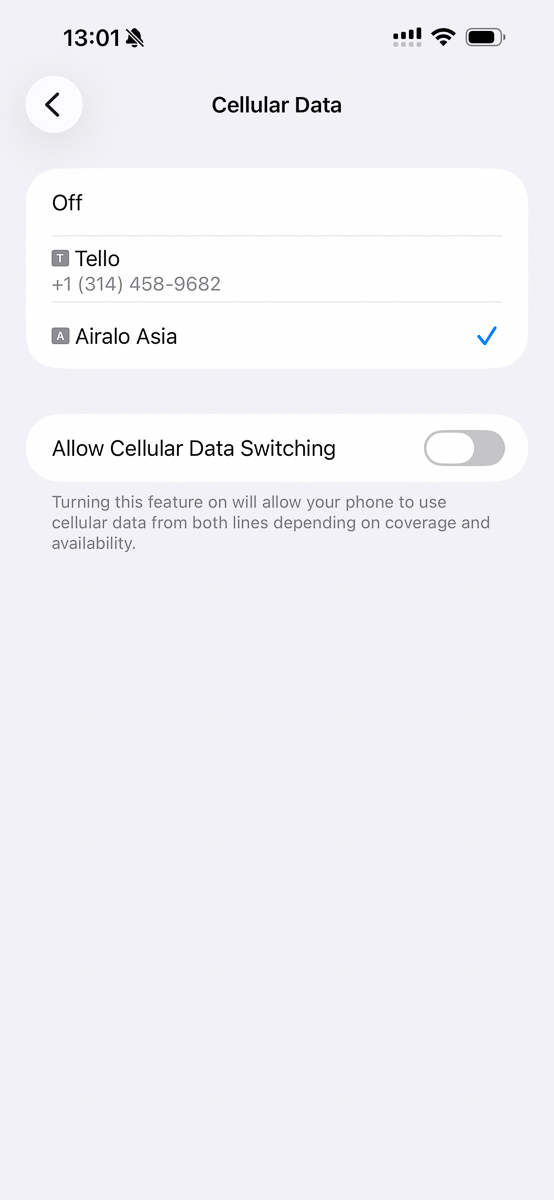
Tip: Make sure that you have your Cellular Data set to the eSIM, and turn off “Allow Cellular Data Switching”