I just used AI to build a custom application, and now there is no going back.

October 9, 2026

Trevis Profile Image

I just built my first production application without ever writing a single line of code, and there is absolutely no going back.


“The era of chiseling code by hand is over”
– David Heinemeier Hansson, creator of Ruby on Rails


I was a professional software engineer for almost 19 years, and a hobbyist before that. I spent the last nine years of my working career managing software developers, but I never stopped being a hobbyist. I love(d) to code.

That sense of satisfaction when it works, the deep flow states that last for hours… It was an incredible exercise in human creativity. I loved it.

Before I retired in 2025 I was quite frustrated with my management role working at a Fortune 500 US company. After a buyout, I was not adapting to the new company culture. My frustration with that situation, and the huge lifestyle changes that my wife and I were planning left me without an active side project for a good year or so. I figured that once I was living work-free, I’d surely get some kind of hobby project going.

Last year I had an idea for a web app that would be very helpful for us in organizing our travel plans. Over a year went by, but I hadn’t gotten around to getting it off of the ground.

Last fall I was on a transatlantic cruise and had a chat with one of my new friends about an idea he had to develop a custom application to make it easier for travelers to find each other on the road. He didn’t have any software development experience, and was debating on how to get the application built.

Less than a year later, he had the first version out in the wild with almost 1,000 people using it.

I met up with him again, ironically on another transatlantic cruise, and I got to chat with him about how he built the app. Turns out he built the entire thing from the ground up with AI. We grabbed lunch and he gave me an overview of how he did it.

As a one time professional engineer, and a life-long hobbyist, I was amazed at what he had done and how fast he did it. Had I taken on a project like that on my own and written it myself from scratch, there’s no way I would have been able to do what he did so quickly. I can’t even imagine what it would have cost if he had hired someone to build it. With no plans to charge people to use the app, it wouldn’t have even been a viable approach.

After sitting with him, watching how he used Claude Code and Chat GPT to develop the project, my curiosity and creative urge went into high gear. A few days later, I signed up for a premium ChatGPT account and started designing.

 Nerd Glossary

First let’s get some nerd vocabulary out of the way:

  • LLM: Large Language Mode, a huge collection of mathematical functions with billions of learned parameters. Those parameters are adjusted during training so the model can take your input, predict what should come next, and generate a response. Products like ChatGPT, Claude Code, and Grok provide interfaces and tools for interacting with LLMs.
  • IDE: Integrated Development Environment. This is a tool for organizing, viewing and editing programming source code.
  • JavaScript / HTML: The cornerstone languages used on the word wide web.
  • Git: a version control system commonly used by software engineers to manage changes to the code files, which are basically just text. It does so in a way that allows you to see how the files have been changed over time. (Git is especially good at managing changes made by multiple users to the same files, and allowing the changes to be merged in a coherent way.)
  • GitHub: An online platform that hosts Git repositories (or projects) so that they can be stored, shared and maintained by multiple people via the web.
  • Web Server: When you enter a URLinto your browser’s address bar, that request is routed to a computer that is (usually) in a data center somewhere. The computer in the data center is a server. The software running on that server that understands how to respond to your request is what I’m referring to as a webserver. There are many of them, and a lot of them are open source (AKA free). Anyone can run a web server on their own computer. It’s what software engineers usually do so that they can build and test web applications locally without needing to put their code onto the public internet.
  • Homebrew a tool used for downloading software packages like programming languages and utilities or tools. It facilitates installing/upgrading packages and keeps track of the versions. It’s the industry standard across pretty much all operating systems, though it was initially created for Mac. It’s a command line tool that is usually, but not exclusively used to download other commandline tools
  • SSH: Secure Shell, a cryptographic network protocol to allow computers to execute commands on a remote system security, over an unsecured network.
  • OAuth: An authentication system designed for web applications
The Process

What my friend had been doing, I thought, was quite a novel approach. He would instruct one LLM to generate a prompt, to get Claude Code to build the application code. The general description of the prompt was fascinating to me because the LLM would fill in gaps of thought and since you could see the prompt you could immediately see if what it was going to do fit your objective. As an example, when my friend was demonstrating this flow to me, he asked the AI to build a web page for a specific purpose, but didn’t list all of the exact pieces of information that the page should present. The AI *understood* the theme and added details that were not specified, but that made sense. In that flow, a person can look at the generated prompt and tune their idea, deciding if those fields were necessary. Or if it was highlighting a larger conceptual issue that needed rework. Without ever even writing any code. It’s like, you tell it what you want in plain English, and it then writes a technical specification.

When I sat down with ChatGPT, I had planned to do it the same way. I told it from the start that my goal was for it to generate the prompts and I would use Claude to write the code. My thinking was that I would build it modularly and in participation with the AI with my active input in IDE.

I started my process by describing to ChatGPT what I wanted to do, and uploaded a screenshot of a spreadsheet that I have been using as a rough idea of the problem I was trying to solve.

We went back and forth and eventually it started generating mock images, and then HTML prototypes inline with our chat. As the prototype became more sophisticated, it suggested that we start mocking it up using real HTML and JavaScript.

Within a couple of days we had the prototype looking quite nice. We were working on my local MacBook and I could run the prototype in a regular web browser. We got it to the point that I wanted to see the prototype on my phone. By this point I’d developed quite a bit of trust over what the tool could do, but I hadn’t even scratched the surface of its capabilities yet. I asked, “Hey, this is nice being able to see it in Safari on my Mac, but how would I view this on my phone?”

Within a few minutes, ChatGPT had installed a web server, updated my firewall settings and then told me what address to paste into my phone’s browser to see it.

Amaze, amaze, amaze.


I didn’t lift a finger. I just sat there sipping my coffee while it went off and did all of the work.

At this point, our design loops went into high gear. The prototype ran so well, and was so easy to adapt by just telling it what I wanted to see, that I began to realize that there may be no need to go down my initial path of using Claude to write the code. The prototype was already the front end code.

I asked it a question about what it had built and it explained to me that the prototype was written in JavaScript and that it had decided to hard code all of the HTML, JavaScript and the sample data into a single file for every version that we would iterate on. That way changes would be progressive, and nothing would be forgotten between changes.

So I asked, “Would you be able to write the production application?”

It answered confidently and said that the production code wouldn’t be organized this way. That it would break the work into the types of files and structure that a typical enterprise application would use.

So I asked, “Where do we start?”

Within an hour, it had built out a project connected to my GitHub account. It walked me through fixing my SSH authentication so that my new MacBook could talk to GitHub. It did a custom uninstall for some old tools that I didn’t even know were still on my machine. It installed HomeBrew, Xcode Command Line tools… all of the things that a professional developer would do. While I just sat back and sipped my bourbon.

I’ve been using ChatGPT for a few years now for a variety of things, but I’d never used it this way. I’ve never had it interacting with my desktop. There were a number of permissions that it needed to be able to do this, but once it had access, what it is capable of is kind of mind blowing.

The AI and I went back and forth for a few days making the prototype richer and richer.

Early work was using the default model, which is great and fast, but it’s expensive. After ChatGPT burned through my allotment of credits rather quickly on something that I asked it to do, I went out to the public interface and asked it questions about the credit usage. The AI suggested that writing code isn’t that complicated and that the model that I was using (ChatGPT 6 Astra) was overkill. That my credits would go much farther if I switched to a smaller model.

Of course it was right.

After switching to ChatGPT – 6 Sol ‘Medium’, it just sips credits now. I’ve only run out a couple of times in a five-hour window since then. By that point I’m usually ready to live my real life for a while.

After getting the project off of the ground, with it pushing code to GitHub I took things to the next level. The production application would need to be hosted on a commercial server in the public space so that it could be used like any website on the Internet. I didn’t want anything to do with passwords, but it would need authentication.

I already have a couple of websites, and one that is “chiseled by hand” is using a hosting service that I’m familiar with. It seemed like using Google as an authentication system shouldn’t be that hard. And, since it seemed like this AI was a wizard at all things, i asked it:

“Hey, what do I need to do to get this site hosted on the web using my service provider with Google authentication?”

Within an hour, it had gone to my hosting services website, read their documentation about what tools and technologies they supported for my tier of service, and decided to rewrite the application in a different language, because my service could host that one without me going to a higher tier!!! It did *everything*. I was opening browser tabs, going through the online forms, filling out everything that was needed like configuring the database, setting up SSL — the only times it asked for my input was when it wanted me to come up with passwords for things that it didn’t want to see.

It went into my Google Cloud console and set up what it needed for me to have Google’s OAuth authentication system as a front end to my site.

It was truly humbling.

I’ve done by hand just about everything that it was doing at some point in my life, and I’ve mostly enjoyed doing it. I mean, I love(d) writing the code, but going through reference documentation and the tedium of wiring up all of this crap is never any fun. Sitting back and watching the AI do what would have taken me days of banging my head, going to stack overflow, googling solutions to esoteric error messages… there was none of that this time. It just took care of all of it.

After this experience I feel like I have a better sense for what it can mean to build an application using an LLM to write the code. I started designing this project with ChatGPT on September 17th. By around September 25, a week later… I had progressed beyond prototype to working demo using code and a local database. By October 2nd, I had a public web address and a working app on the internet. Two weeks. And never once have I written a single line of code. I’ve browsed the source code out of curiosity to see the types of decisions it made about naming files and decomposing logic, but I didn’t go any further.

One of the most impressive things to me as a person who worked in this space as a professional for almost half of my life is how the AI covers gaps and edge cases. For example, in the real world, one frustration that developers are often met with is a design that is presented as complete but it only shows what happens when things are successful —no screens designed for what happens if things go sideways. It burns a lot of cycles going back and forth between the product team, design team and development teams. But when you give AI a description of what you want without those things clarified, it just makes choices for you. I didn’t always love the choices it made, but not once did I ever see the code that the LLM generated crash. It always handled the unexpected in a way that was reasonable. I could then go back and give it more specific guidance as to how I wanted to handle the situation. When a tester entered a dollar value that was bigger than an integer could represent, as the tester (my lovely wife) did, the app handled it. It gave her a clear error message about what had happened. I later went back and told the AI not to let users even enter values that large which is a better user experience, but the way it initially decided to handle it wasn’t wrong. And it didn’t crash!

There was one situation where I asked the LLM to “close dialogs when the user deselects a drop down menu”. Instead of just doing exactly what I asked, it pushed back. It asked me, “Do you really mean close the dialog when they deselect the dropdown, or when they deselect the dialog.” I was very impressed. My sloppy language was not what I wanted, it was not reasonable. The AI realized that, pushed back and asked if I was sure.

One thing that has become even more clear to me than ever before is that an application written by AI, isn’t developed by AI. The intent comes from the operator. The intent is a human desire. What AI brings to the table is the ability to turn your idea into reality at speeds that not even the best coder on earth could come close to.

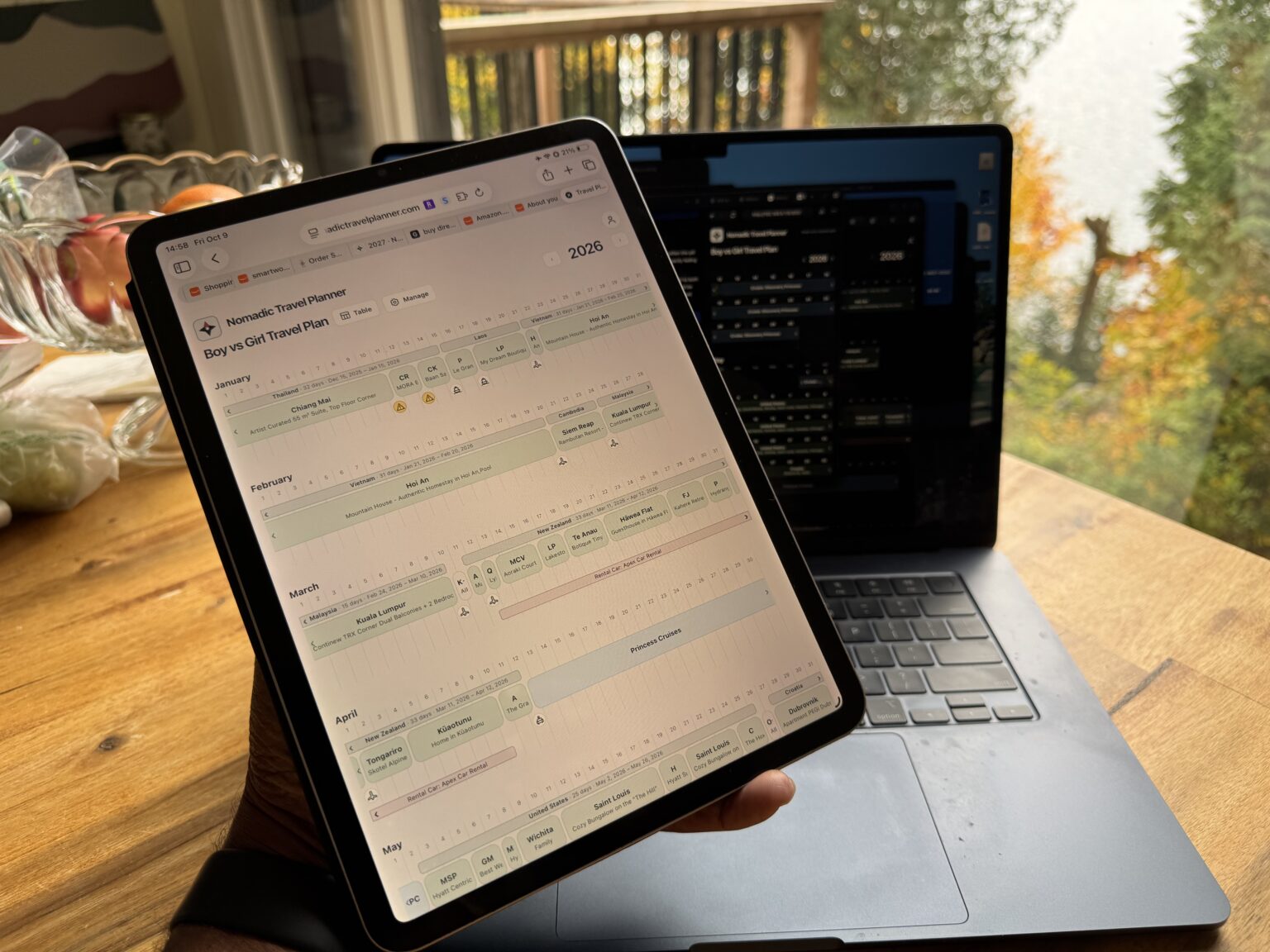
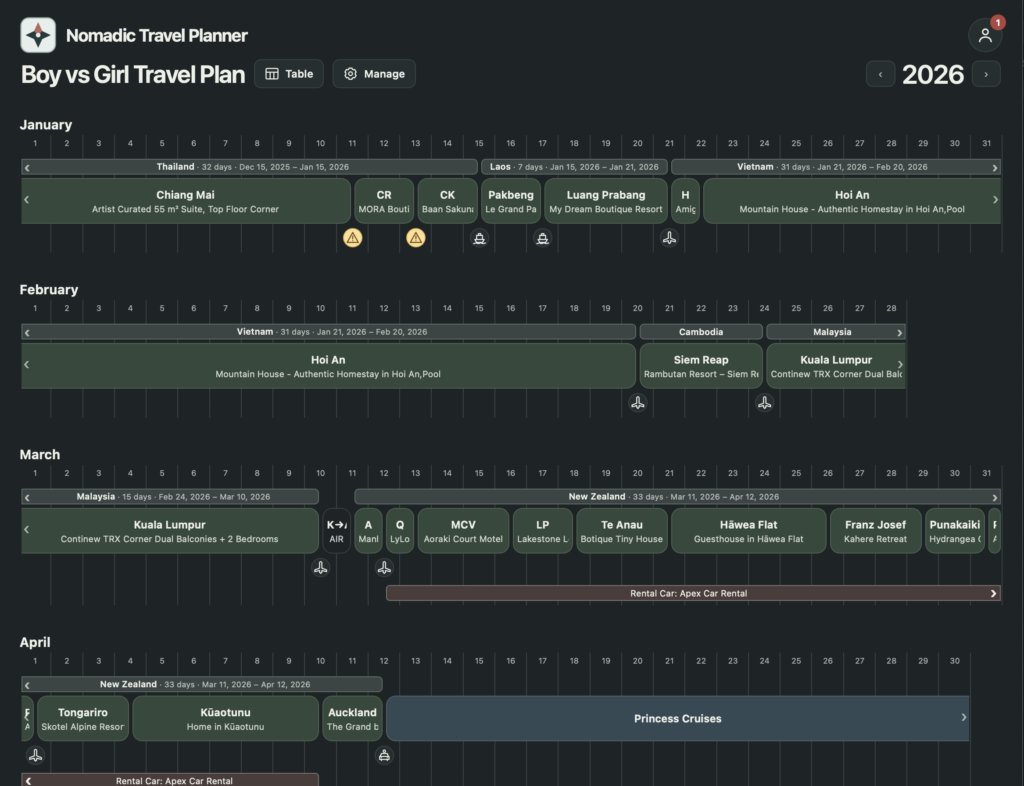
Screenshot of the current build of my new travel planning app

The era of chiseling code by hand is over.

The skill that paid for my life, the thing that I had both a natural talent for and a deep love of… is over. And you know what? I’m not sad about it. LLM technology allows me to bring my ideas to life faster than I can dream them up. From here, there’s no going back.

It would be rude of me to close this article without saying that while “I’m not sad about it”, I am very concerned for what this means for the millions of trained software engineers whose careers were built around writing code by hand. The world has changed so fast that there’s not been time for the number of people trained, and currently training, for the role to equalize with the number of jobs out there. And yes, we arrogant developers who would say things like, “Learn to code!” to anyone who was unhappy about their low wage work may deserve some, “Ha ha! in your face!” But the scale of change, and how fast it’s come feels unprecedented. Says the blacksmith as the Model T arrives.

I may be closing this with a contradiction but I also want to say; I don’t believe that the number of people paid to write code will go to zero, but it will become an extremely specialized niche. I suspect that the world will need those people not in the millions, but in the thousands.

How do I follow you?

Want to keep up with our latest blog posts when we add them? The best place to do that is on Facebook.  Like and follow our page: Boy vs Girl Slow Travel on Facebook.  We post our blog articles there when they are released.  Facebook well let you know when we have new ones.

Where have we been?

Search Blog Posts